Computer Vision Model

With three vision sensors onboard—a base camera, an arm-mounted camera, and a LiDAR—we had multiple options for detecting and localizing objects relative to the robot. However, due to the LiDAR's mounting height, it proved ineffective for depth estimation of ground-level objects. Furthermore, our task centered on object-relative manipulation rather than environment navigation. We employed direct visual feedback from the cameras to detect and localize objects relative to the robot's current position, eliminating the need for persistent mapping or SLAM capabilities. We utilized both cameras in a complementary manner: the base camera for initial object detection and coarse robot positioning, and the arm-mounted camera for providing close-range visual feedback during precise manipulation and pickup operations.

Image Processing Pipeline

The perception pipeline begins with processing raw RGB images from the onboard camera that are published to the default Innate topics. To ensure robust detection, we perform a series of operations:

  1. Convert the image to grayscale given a white object
  2. Apply a white intensity threshold to only account for white objects
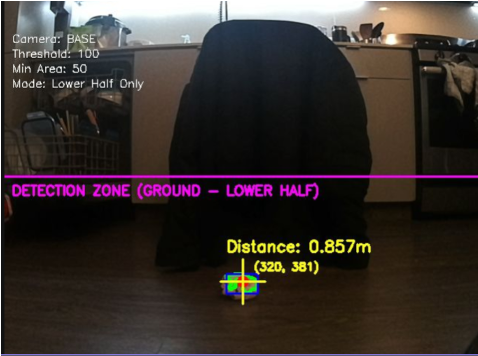
  3. Plane filtering to mask out the upper half of the image, ignoring background noise
  4. Morphological operations (erosion-dilation) to remove noise and smooth the object's silhouette

Once the filtering is processed, we use the built-in contour function of the OpenCV model to detect the object, which can then be used for localization.

# From detect_object.py

def detect_white_object(self, image, camera_params, camera_name="unknown"):
    # Convert to grayscale
    gray = cv2.cvtColor(image, cv2.COLOR_BGR2GRAY)
    
    # Threshold to find white objects
    _, binary = cv2.threshold(gray, self.white_threshold, 255, cv2.THRESH_BINARY)
    
    # FILTER: Masking (Base camera ignores upper half of image)
    if camera_name == "BASE":
        mask = np.zeros_like(binary)
        mask[h_img//2:, :] = 255  # Only bottom half
        binary = cv2.bitwise_and(binary, mask)
    
    # Morphological operations to remove noise
    kernel = np.ones((5, 5), np.uint8)
    binary = cv2.morphologyEx(binary, cv2.MORPH_OPEN, kernel)
    binary = cv2.morphologyEx(binary, cv2.MORPH_CLOSE, kernel)
    
    # Find contours
    contours, _ = cv2.findContours(binary, cv2.RETR_EXTERNAL, cv2.CHAIN_APPROX_SIMPLE)

Localization & Depth Estimation

Once the contour is found, we calculate the centroid using image moments, which is more stable than using a simple bounding box. Depth is estimated using similar triangles based on the object's known real-world size and its apparent pixel size.

Finally, we project the 2D pixel coordinates into a 3D position vector (x, y, z) in the camera frame. This 3D pose is published to ROS topics to be used by the motion planner.

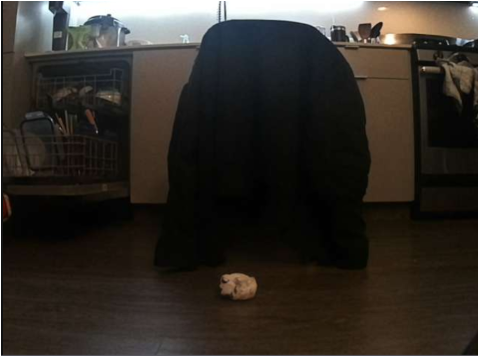
Raw Camera Feed
Threshold & Masked

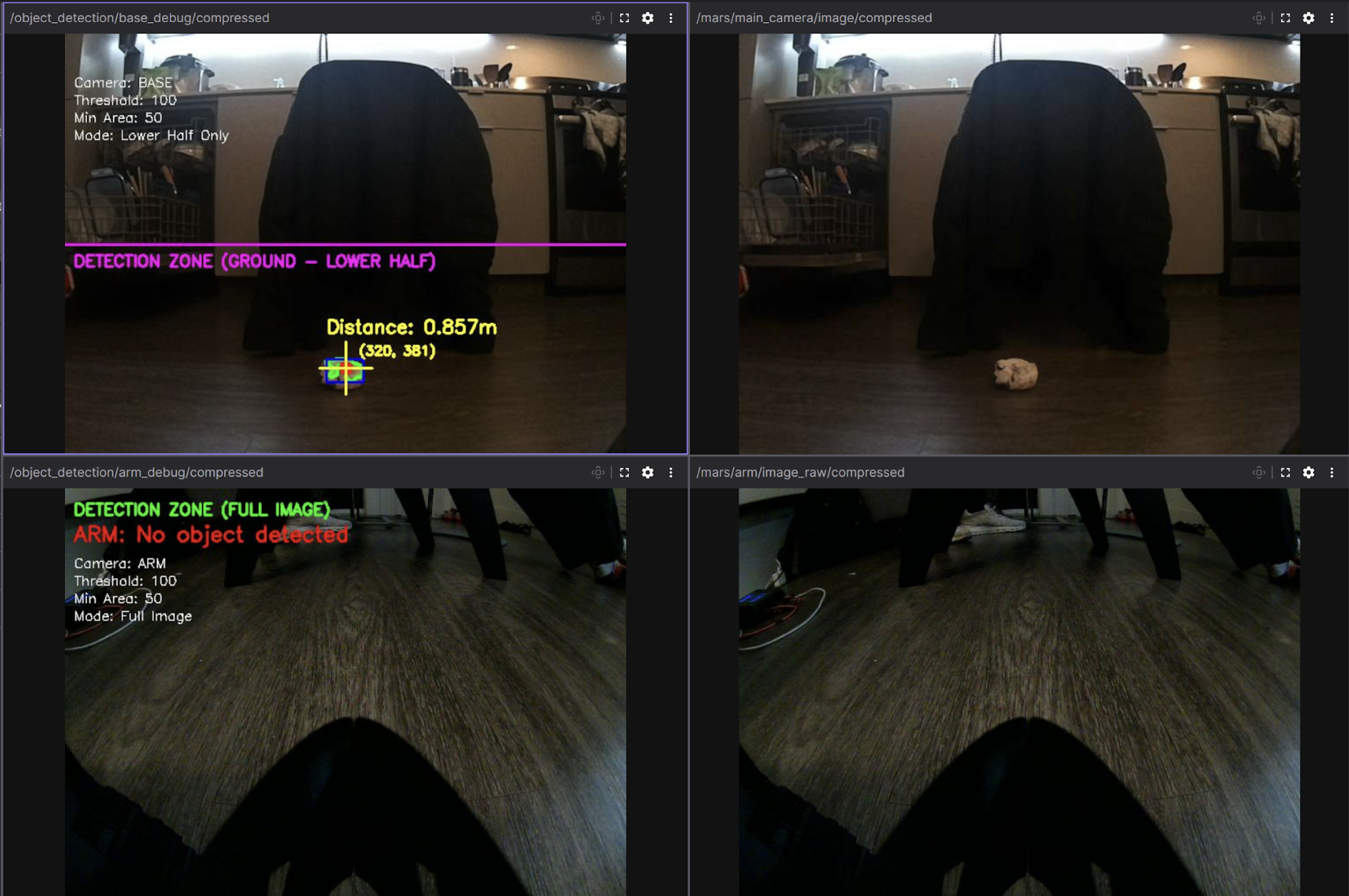
Real-Time Visualization (Foxglove)

For remote visualization from our Windows development machine, we utilized Foxglove Studio, a web-based tool that provides cross-platform ROS2 compatibility without requiring native installations. However, transmitting raw camera feeds over WiFi proved problematic, consuming over 100 MB/s of bandwidth and causing significant lag.

To address this, we implemented custom debug image publishers that overlay detection data (contours, distances, and detection zones) directly onto the camera feeds before compressing to JPEG format. This reduced bandwidth to approximately 7 MB/s, enabling real-time visualization of the robot's perception and decision-making without network congestion.

# From detect_object.py

def publish_debug_image(self, image, detection, camera_name):
    """Create and publish debug visualization (both raw and compressed)"""
    debug_img = image.copy()
    
    # Draw detection region boundary
    if camera_name == "BASE":
        cv2.line(debug_img, (0, h_img//2), (w_img, h_img//2), (255, 0, 255), 2)
        cv2.putText(debug_img, "DETECTION ZONE", (10, h_img//2 + 25), ...)

    if detection is not None:
        # Draw contour and centroid
        cv2.drawContours(debug_img, [detection['contour']], -1, (0, 255, 0), 3)
        cv2.circle(debug_img, (cx, cy), 8, (0, 0, 255), -1)
        
        # Add distance text overlay
        dist_text = f"Distance: {detection['distance']:.3f}m"
        cv2.putText(debug_img, dist_text, (x, y-30), ...)

    # Encode as JPEG for efficient network transmission
    encode_param = [int(cv2.IMWRITE_JPEG_QUALITY), self.jpeg_quality]
    success, compressed_data = cv2.imencode('.jpg', debug_img, encode_param)
    
    # Publish compressed message
    compressed_msg = CompressedImage()
    compressed_msg.format = "jpeg"
    compressed_msg.data = compressed_data.tobytes()
    self.base_debug_compressed_pub.publish(compressed_msg)