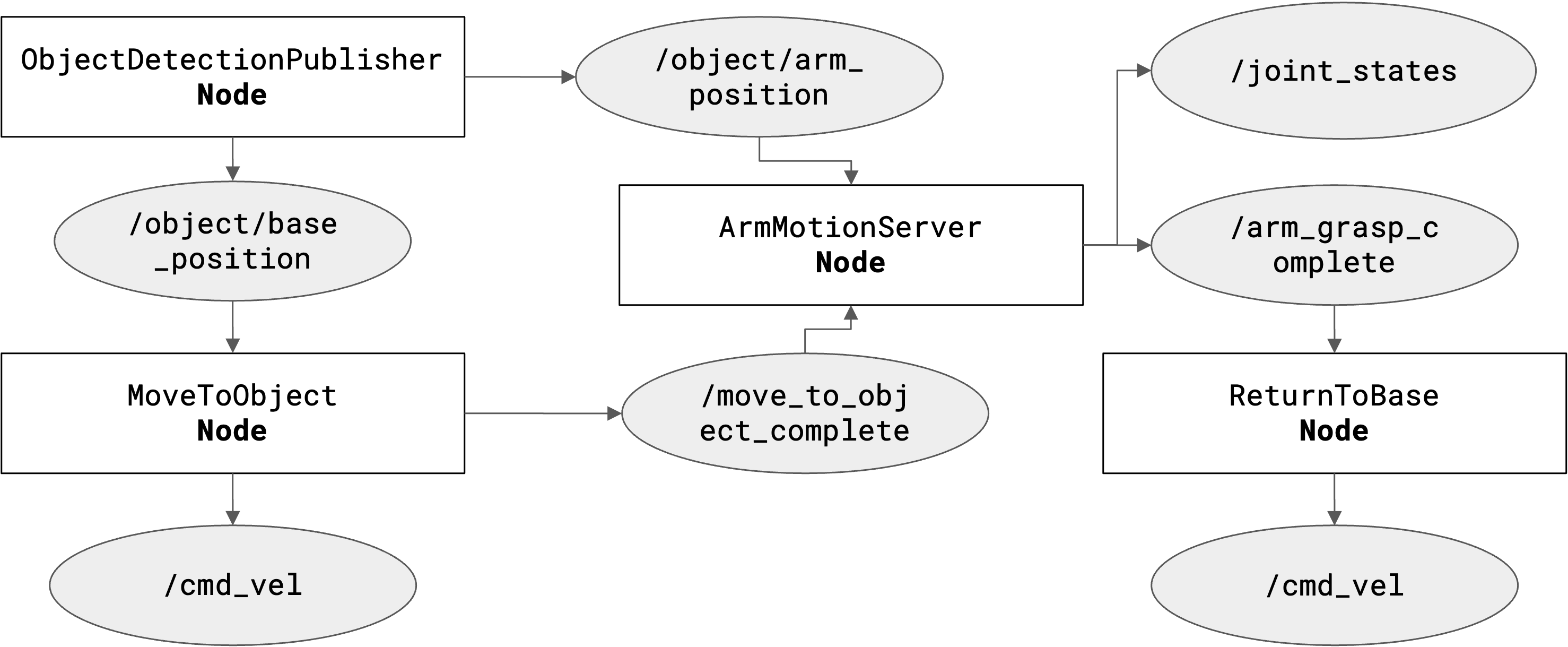
1. Navigation Planning: Bézier Curves

Standard point-to-point navigation results in jerky, robotic motion. To solve this, we implemented a Cubic Bézier Generator. This algorithm calculates a smooth curved path connecting the robot's current heading to the target vector, allowing for continuous momentum and mechanically gentle turns.

The control points are dynamically offset based on the robot's current speed and orientation, ensuring the path is mathematically continuous (C1 continuity).

# From move_to_object.py

def generate_bezier_waypoints(self, x1, y1, theta1, x2, y2, theta2):
    """
    Generate (x, y, theta) waypoints along a smooth Bézier path.
    Uses control points d1/d2 to ensure heading continuity.
    """
    d1 = np.array([np.cos(theta1), np.sin(theta1)])
    d2 = np.array([-np.cos(theta2), -np.sin(theta2)])
    
    # Offset control points to shape the curve
    c1 = np.array([x1, y1]) + self.bezier_offset * d1
    c2 = np.array([x2, y2]) + self.bezier_offset * d2
    
    # Sample points along the curve
    t_vals = np.linspace(0, 1, self.num_waypoints)
    pts = [self.bezier_curve(np.array([x1, y1]), c1, c2, np.array([x2, y2]), t) for t in t_vals]
    
    return pts

2. Arm Trajectory Strategy

The arm does not simply move from point A to point B. To prevent collisions and ensure a vertical grasp, we designed a 4-Stage Discrete Trajectory. Each stage serves a specific safety or perception purpose:

  • Stage 1: Overhead Position. Moves the camera to its highest vantage point to maximize the field of view for detection.
  • Stage 2: Midpoint Re-evaluation. The arm pauses to re-calculate the object's position, correcting for any odometry drift that occurred during the approach.
  • Stage 3: Grasping Position. The end-effector descends vertically with a calculated Z-axis offset to align the gripper jaws.
  • Stage 4: Home Position. Securely retracts the object to the center of mass for stability during the return trip.
# From arm_movement.py: State Definition

class GraspState(Enum):
    IDLE = 0
    MOVE_TO_OVERHEAD = 2       # Stage 1: Maximize visibility
    POSITION_ABOVE_OBJECT = 6  # Stage 2: Align with target
    LOWER_TO_OBJECT = 8        # Stage 3: Vertical descent
    RETURN_TO_REST = 11        # Stage 4: Safe transport mode

def plan_arm_path(self, state):
    """Calculates IK targets based on current state"""
    if state == GraspState.MOVE_TO_OVERHEAD:
        return self.ik_solver.get_joint_angles(x=0.2, y=0.0, z=0.4) # High pose
    elif state == GraspState.LOWER_TO_OBJECT:
        # Use transformed vision coordinates
        target = self.calculate_object_position_in_base()
        return self.ik_solver.get_joint_angles(target.x, target.y, target.z + GRASP_OFFSET)

3. Coordinate Frame Architecture (TF2)

A major challenge was unifying the disparate coordinate systems. The vision system sees in the camera_optical_frame, the navigation system plans in odom, and the arm solves kinematics in base_link.

We implemented a rigid TF2 Tree to handle these transforms dynamically. This allows us to detect an object in the camera frame and instantaneously query its position relative to the base, regardless of the arm's current angle or the robot's position in the room.

# From detect_object.py: The TF Lookup Logic

def transform_camera_to_base(self, detection_point):
    """
    Transforms a point from the dynamic Camera Frame to the fixed Base Frame.
    This accounts for the arm's current rotation and extension.
    """
    try:
        # Lookup the transform at the exact time of detection
        transform = self.tf_buffer.lookup_transform(
            'base_link',          # Target Frame
            'camera_link',        # Source Frame
            rclpy.time.Time()
        )
        
        # Apply rotation and translation math
        p_base = do_transform_point(detection_point, transform)
        return p_base
        
    except TransformException as ex:
        self.get_logger().warn(f'Could not transform point: {ex}')
        return None

4. Return Planning: Odometry Integration

To return home, the robot calculates the Euclidean distance traveled from its starting pose. This is more robust than time-based open-loop control, as it adapts to battery voltage fluctuations and wheel slip.

# From return_to_base.py

# Calculate Euclidean distance traveled from start
dx = x - self.start_x
dy = y - self.start_y
distance_traveled = math.sqrt(dx**2 + dy**2)

# Check if we've traveled far enough
if distance_traveled >= self.return_distance:
    self.stop_robot()